Let your pipeline fix itself
Use GitHub Actions + the Claude API to maintain your automations
Tl;dr: This post discusses a workflow for using Claude API calls within GitHub Actions to catch breakage, have Claude write the fix, and email you a summary of the fix for review. It walks you through the basic setup of a scheduled pipeline on GitHub Actions, how to add email alerts, and then how to upgrade to an auto-fixing workflow using the Anthropic/Claude API that triggers on failure.
I’ll use my news-scraper project as the running example: it visits ~150 news websites every morning, saves what’s on their homepages, and commits the data to a GitHub repository. Websites change their layout all the time, so things break regularly — which makes it a perfect test case.
1. Build it with Claude
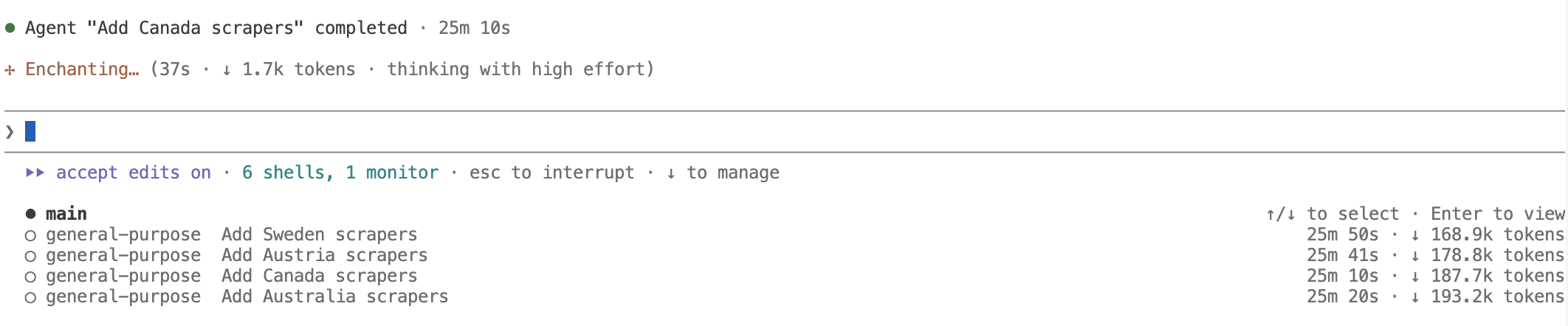
The whole pipeline — the scrapers, the schedule, the checks — was built using Claude Code. You probably know this already: describe what you want in plain language (“add scrapers for the top Spanish news sites, test each one, open a pull request”), maybe provide a list of relevant news outlets, and Claude writes, tests, and packages the code for review. For bigger jobs it can run several agents in parallel, each building a different part. You might enrich the process by adding skills and updating the Claude.md file to learn form past mistakes and dead ends.
2. Run it on a schedule with GitHub Actions
What Claude Code does not do is to ensure your pipeline keeps running every day. For that, you need a scheduler.
GitHub Actions is the automation service built into every GitHub repository. You add a small text file to a folder called .github/workflows/ in your repository, and GitHub reads it and does what it says: on a schedule, whenever code changes, or whenever another workflow finishes. Public repositories use it for free; private ones get a generous monthly allowance (we’ll get to setting budgets for this). People use it for everything from running tests to publishing websites — here, we use it to run our data collection every morning.
This is the entire scheduling logic for the Spanish scrape:
# .github/workflows/scrape_es.yml
on:
  schedule:
    - cron: "0 6 * * *"   # every day at 6:00 UTC (8am in Spain)

jobs:
  scrape-es:
    runs-on: ubuntu-latest
    steps:
      - uses: actions/checkout@v6
      - run: pip install -r requirements.txt
      - run: python main.py  --country ES
Reading it top to bottom:
on: schedule:— when to run. Thecron: "0 6 * * *"line is a compact way of writing a schedule (the five slots mean minute, hour, day, month, weekday — so this says “minute 0, hour 6, every day”).runs-on: ubuntu-latest— GitHub starts a fresh, disposable Linux machine for each run. You never see or maintain it; it’s deleted when the run ends.steps:— what to do on that machine, in order: download your repository onto it (checkout), install the project’s required software (pip install), and then run the actual program (python main.py …), with our country-specific flags. That last line is the only project-specific part — yours might run an R script, a database export, anything.
No server to maintain, no laptop that has to be on. GitHub runs it every morning.
3. Catch breakage with email alerts
After every run, a small script checks whether the results look healthy — in my case, “did every news site return at least half its usual number of articles?”. When this script exits with an error, an email step fires if anything failed:
      - run: python check_scrape_health.py     # fails if results look wrong

      - name: Send alert email on failure
        if: failure()
        uses: dawidd6/action-send-mail@v16
        with:
          subject: "Scraper Alert (ES): outlet(s) below threshold"
          to: ${{ secrets.ALERT_EMAIL_TO }}
          # ... mail server settings live in repository secrets
Two ideas are doing the work here:
- The first line runs the checking script — a failed check ends in an error, which marks the whole run failed. Everything else hangs on that signal.
if: failure()means “only run this step if something above went wrong.” The step itself uses a ready-made, community-built email action — you fill in a subject and a recipient and you’re done. The address and mail password aren’t written in the file;secrets.…pulls them from your repository’s settings, where they’re stored encrypted and never appear in the code or the logs.
This to me was already a considerable upgrade from locally running scripts or silent breakage - whenever something broke, I would get an email alerting me something is wrong. But: every alert is homework. You read the logs, find the cause, fix the code, test it — even if you use Claude to write the actual fix, you still have to sit down, find the repo, and pay attention. As this project is not exactly on the top of my agenda, the failures pile up unattended until I start a Claude Code instance on a late Friday afternoon and have all issues and failed runs tended to. This means more work, many emails cluttering my inbox, and missing data.
4. How to use Claude API calls to auto-fix breakage
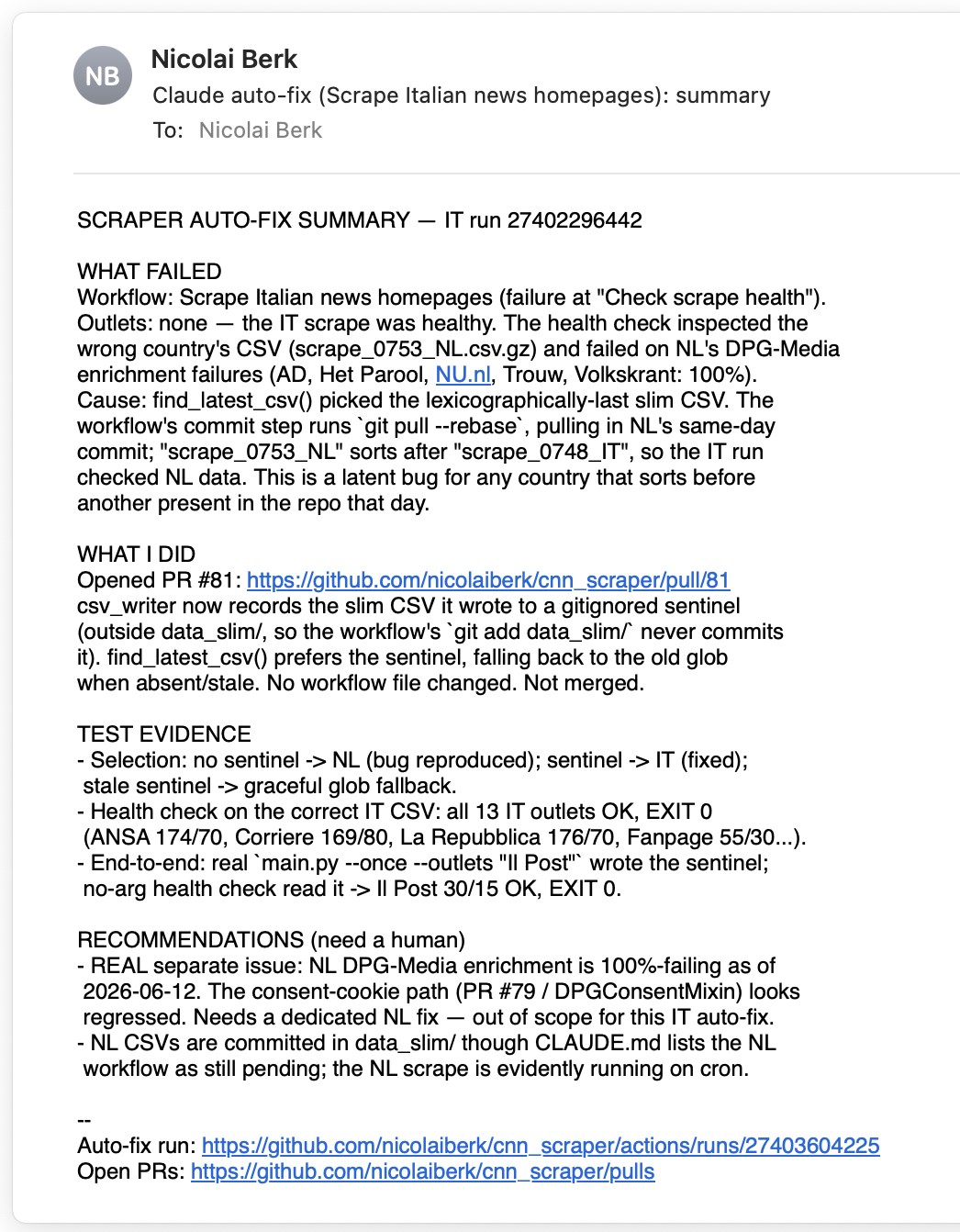
So instead, I wondered if I could directly trigger Claude to have a look at the issue and write a PR whenever the pipeline fails.This was a considerable upgrade to my current approach and it was surprisingly easy to implement. Whenever a run fails, it now calls the Claude API — which reads the logs, finds the cause, writes the fix, tests it, opens a pull request, and emails you a summary. This means, rather than having a look at the issue, you already have a potential solution waiting for you, and your only job is to review the PR and merge if it looks good. If the fix isn’t good, you still saved time: the diagnosis is done, and you can either edit the PR or close it and start a new one with a better prompt.
# .github/workflows/claude_autofix.yml
on:
  workflow_run:
    workflows: ["Scrape Spanish news homepages", ...]   # watch the pipelines
    types: [completed]

jobs:
  autofix:
    if: github.event.workflow_run.conclusion == 'failure'
    runs-on: ubuntu-latest
    steps:
      - uses: actions/checkout@v6
      - uses: anthropics/claude-code-action@v1
        with:
          anthropic_api_key: ${{ secrets.ANTHROPIC_API_KEY }}
          prompt: |
            The scheduled workflow just failed. Read its logs, find the
            root cause, write a minimal fix, test it, and open a pull
            request — do NOT merge it. Then write a short summary
            (what failed, what you did, test evidence) for the maintainer.
      # ... a final step emails Claude's summary, same mail action as above
Walking through it:
on: workflow_run:— instead of a clock, this workflow’s trigger is other workflows. You list the pipelines to watch, and it starts whenever one of them finishes.if: …conclusion == 'failure'— but it only does anything when the watched run actually failed. On the (hopefully many) successful days, nothing runs and nothing is spent.anthropics/claude-code-action— the official building block that puts Claude at the keyboard of this temporary machine, with your repository checked out in front of it and your API key (again from secrets) to pay for the call.- The
promptis the program. Those plain-English sentences are the entire instruction set: read the logs, find the cause, fix minimally, test, open a pull request, never merge, write me a summary. If you want different behavior — “only diagnose, don’t fix”, “also check the database” — you edit the prose, not code.
Here is an actual email produced by claude after a failed summary:
Getting the API key. The one piece of setup this requires is an Anthropic API key — the credential that lets the workflow call Claude. To do this, create an account at the Anthropic Console, open API Keys, and generate a key (it’s shown once — copy it immediately). Then hand it to your repository: on GitHub, go to your repo’s Settings → Secrets and variables → Actions → New repository secret, name it ANTHROPIC_API_KEY, and paste the key. That’s what the ${{ secrets.ANTHROPIC_API_KEY }} line in the workflow refers to — the key itself never appears in your code, your commits, or the logs.
Unfortunately, API usage is billed separately from any potentially existing Claude subscription, on a pay-as-you-go basis. The amounts here should be relatively small (the agent only runs when something breaks), but I did not yet get to thoroughly review the cost. The next section covers how to keep an eye on that and set hard limits.
What to use this for
In general, these vibe-coding agents are best for tasks that are easily verifiable, quality checks can be run on the output, and the fix is likely to be small and localized. So when the model has to change a css or xpath selector to fix a scraper, or update a line of code to handle a new edge case, this is a great fit. Where I would never use this setup is with very complicated workflows or anything that involves analysis. You might use this setup to have Claude write a report to clarify the issue, but that is obviously far less useful and potantially even redundant.
A note on permissions and security
The agent’s permissions are tightly controlled in this workflow — they’re written down, in the same workflow file, in two layers. The first is what the workflow may do on GitHub; the second is what Claude may do on the machine:
# Layer 1 — GitHub permissions: the most this workflow can ever do on the repo
permissions:
  contents: write        # push a branch with the fix
  pull-requests: write   # open / comment on pull requests
  issues: write          # open an issue when escalating
  actions: read          # read the failed run's logs

jobs:
  autofix:
    timeout-minutes: 45            # hard stop on the whole job
    steps:
      - uses: anthropics/claude-code-action@v1
        with:
          # Layer 2 — Claude's toolbox and effort cap
          claude_args: |
            --allowedTools "Bash,Read,Write,Edit,Glob,Grep,WebFetch"
            --max-turns 80
Layer 1 is enforced by GitHub itself: whatever Claude does, the workflow’s token physically cannot delete the repository, change settings, or touch anything not listed. Notice what’s absent — there is no “merge” permission concept to grant beyond these, and the prompt forbids merging on top. Layer 2 is enforced by the Claude action: --allowedTools lists the only tools the agent may use (run commands, read/edit files, fetch web pages — nothing else), and --max-turns 80 caps how many steps it can take before it must stop, whatever state it’s in.
Note that is a somewhat broad allowance for Claude - it can basically use bash for anything on the VM, so a rogue agent or a prompt injection could still use the VM for something malicious - however only for 45 minutes/80 turns. You could restrict the web access further by restricting to specific domains.
Additional safeguards in the workflow:
- It can never merge. It only opens pull requests; a human is always the final gate before anything reaches the real pipeline.
- Keys live in repository secrets, never in the code — and the API key is capped by a workspace spend limit (see “Keeping an eye on costs” below), so a runaway job can’t surprise you on the bill.
- Only one auto-fix runs at a time (a
concurrencyrule in the workflow), so two failures can’t spawn agents that trip over each other. - It checks before acting: if an open pull request already covers the same problem, it adds a comment instead of duplicating work.
Keeping an eye on costs
Two meters run in this setup, both easy to cap:
- GitHub Actions. Public repositories run for free. Private ones get a monthly allowance of included minutes (2,000–3,000 depending on plan); after that, minutes are billed. You can see usage and set a hard spending limit (including $0, which simply pauses runs at the allowance) under your account’s Settings → Billing. A daily pipeline of a few minutes fits comfortably.
- Anthropic API. In the Console, either set a limit on total spending, or put the key in its own workspace and give that workspace a monthly spend limit and email alerts — a runaway job then stops at the cap instead of surprising you. The Usage page shows exactly what each day cost. Remember: this is pay-as-you-go, on top of any Claude subscription you have.